
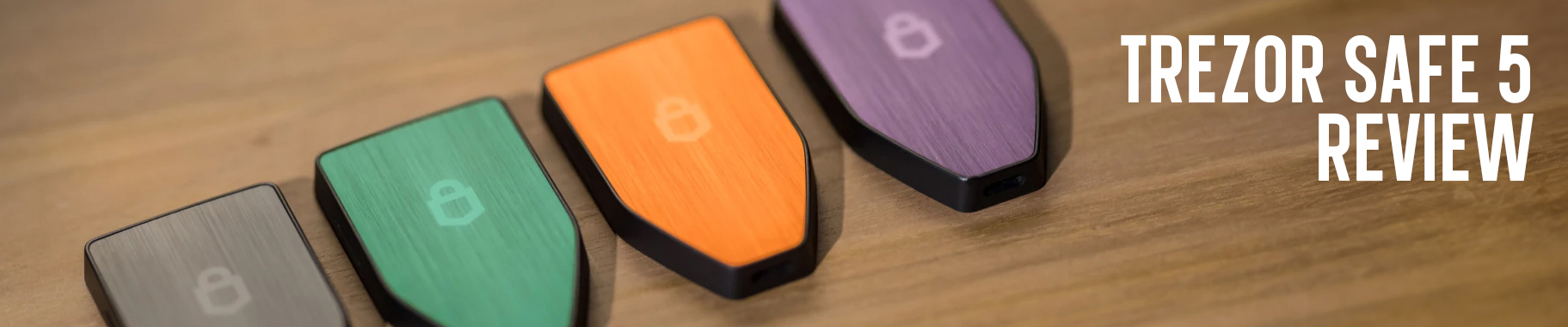
Trezor’s entry into the modern touchscreen hardware wallet market, began with the Trezor Safe 5. Arriving as the true successor to the aging Model T, the Safe 5 represented a major leap. It merges the powerful open-source security Trezor is known for, with a contemporary user experience. It was the first model in the series to combine a vibrant color touchscreen and a certified Secure Element chip. Accompanied by advanced features like SLIP-39 (Shamir Backup) into a single accessible device.
While newer models like the Safe 7 have since taken the spotlight with wireless capabilities and dual-chip architecture. The Safe 5 initially kind of carved out its own necessary niche. It pretty much answered the call, for a wallet that was more intuitive than the button based Safe 3. Yet more affordable and straightforward than the fully-loaded premium options. This review breaks down whether the Trezor Safe 5 remains a compelling, security-first choice for the practical crypto user. Or, if its position has been overtaken by the very evolution it helped spark.
Key Takeaways
- Security-First Without Compromise: The Trezor Safe 5 delivers strong and transparent security through its NDA-free EAL 6+ Secure Element, open-source design, Shamir Backup, and optional MicroSD PIN encryption. Prioritizing protection over convenience.
- Modern Usability Done Right: Its responsive color touchscreen, haptic feedback, and Gorilla Glass protection, make daily interactions intuitive and reliable. Offering a major upgrade from button based wallets, without sacrificing security.
- Balanced Value for Serious Holders: Positioned between entry level and premium wallets. The Safe 5 is ideal for long-term and diversified crypto holders, who want a refined experience and robust security. Without the Bluetooth or wireless trade-offs.
Hardware & Build Quality
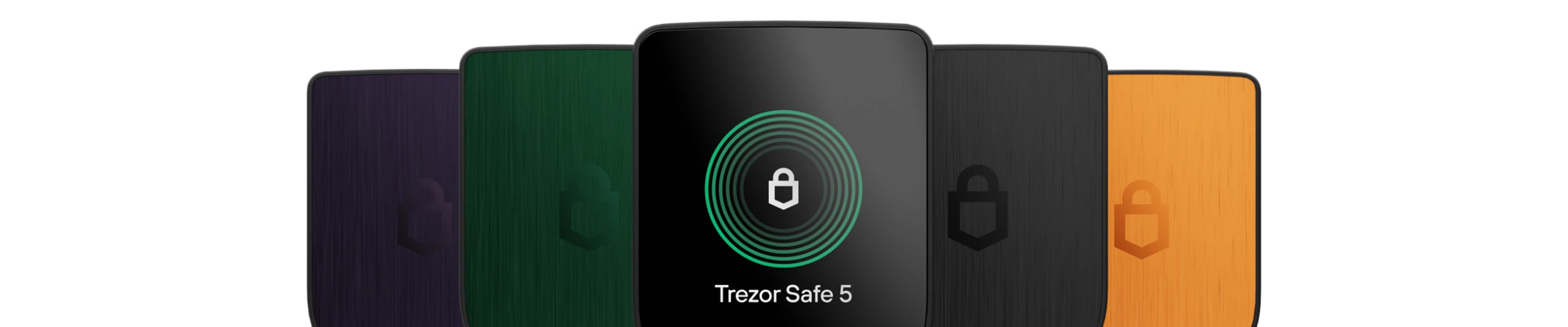
The Trezor Safe 5 makes its entry into the color touchscreen market, with a design that’s both familiar and refined. It’s available in three sleek color options for the multi-coin version: Black Graphite, Violet Ore, and Green Beryl. For Bitcoin maximalists, the Bitcoin only edition comes in a distinct vibrant orange.
When in hand, the Safe 5 feels quite sturdy, compact and secure without feeling too bulky. Weighing in at just 23 grams, it’s lightweight enough for pocketability but retains a fairly solid and confident feel. While the casing is constructed from durable PC-ABS plastic. The anodized aluminum backplate, along with its premium brushed-metal finish. Provide a sense of style that elevates the Safe 5, beyond just a simple plastic gadget.
The centerpiece, of course, is the 1.54-inch color touchscreen. Visually and dimensionally, it’s a clear successor to the Model T’s display. However, Trezor has significantly upgraded the experience. The screen is very responsive and among the best we’ve tested on a hardware wallet. It is protected by scratch resistant Gorilla Glass 3, which is essentially the same material used on smartphones. This makes it up to nine times stronger than standard glass. The durability for a device like this is crucial, as it’s meant to last for years in pockets and bags.
Additionally, the user experience is further enhanced by Trezor’s quite precise haptic feedback. Every tap and confirmation is met with a subtle vibrational response, mirroring the tactile feel of a smartphone. This combination of a bright and crisp color display, along with responsive touch controls. Creates an experience where navigating menus, entering PINs, and verifying transaction details. Is far more intuitive than the two button systems of older models. It’s a design that doesn’t just look modern. It feels modern and deliberate in daily use.
*Note the Bitcoin orange version is installed with the Bitcoin firmware pre-installed. However once setup, you can manually switch to the multi-coin firmware in Trezor Suite.
Connectivity & Security
The Safe 5’s security model is where it makes a pretty serious leap beyond basic cold storage. Connectivity is deliberately simple here. You get a USB-C port for power and data, with no Bluetooth or wireless features whatsoever. This wired only / non-wireless design of the Safe 5, is actually a core security strength. Though not air-gapped, it helps to eliminate multiple threats that wireless devices have to contend with.
The foundation of the device is its NDA-free EAL 6+ Secure Element (OPTIGA™ Trust M V3). The “EAL 6+” certification is essentially an internationally recognized benchmark for high security chips. Think passports and smart cards, designed to resist physical tampering and brute-force attacks. More importantly, “NDA-free” means Trezor has full transparency agreements with the chip manufacturer. This allows the entire design, from hardware to firmware, to pretty much remain 100% open-source. The crypto community can continuously audit and verify everything, which is pretty much a cornerstone of trust in this space.
This secure element works alongside several other security features. For example, the MicroSD card slot on the device’s side isn’t for storage, it’s for advanced PIN encryption. By encrypting your PIN with a randomly generated secret stored on the card, you create a mandatory two-factor physical check. You will essentially need both the device and the specific MicroSD card to unlock it.
Firmware integrity is handled by secure bootloader verification. This tool cryptographically checks that only authentic and untampered Trezor software runs on the device. For recovery, the Safe 5 introduces the SLIP-39 standard (Shamir Backup). This lets you split your 20-word recovery seed into multiple “shares.” You can then set a threshold (something like 3 of 5 shares) for recovery, which helps to add serious resilience against loss or theft. Of course, it still supports the traditional BIP-39 standard (12 or 24 words) if you prefer.
For advanced privacy, the device supports creating a hidden wallet via a passphrase (often called a 25th word). This generates a completely separate wallet from your main seed, providing plausible deniability. A powerful tool if you’re dealing with sophisticated threat models. (1, 2)
Note: The lack of Bluetooth and iOS transaction support may seem like limitations, but they’re intentional trade-offs in favor of a non-wireless & physically controlled security model. One which prioritizes reduced remote attack surface over convenience.
Trezor Suite & User Experience
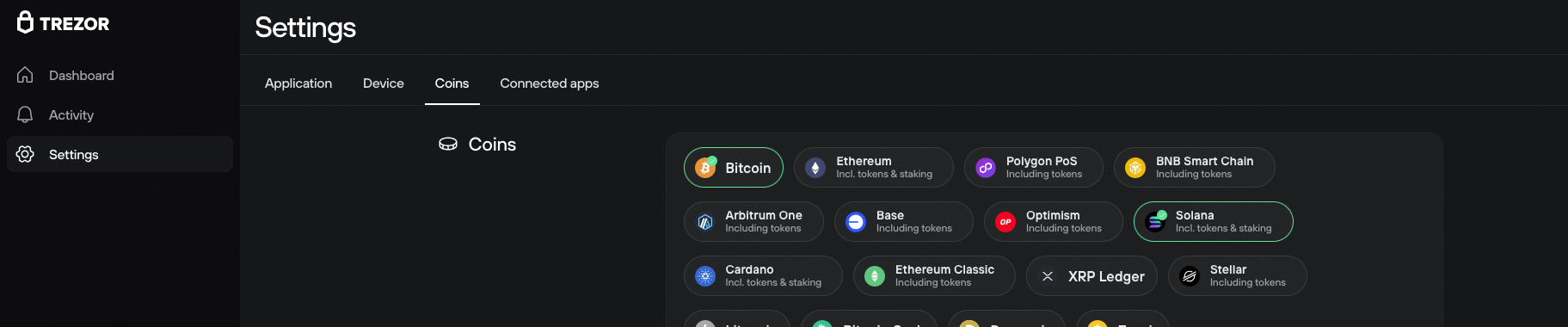
The Trezor Safe 5 doesn’t operate on its own. Its real potential comes through Trezor Suite, the unified desktop application that pretty much serves as your control center for your crypto. Available for Windows, macOS and Linux. Trezor Suite provides a clean dashboard for managing your entire portfolio. Whether viewing balances, buying, selling or executing transactions. The experience is straightforward: plug in your Safe 5 via USB-C, enter your PIN on the device, and your assets are ready to manage.
Where the Safe 5’s hardware really shines is in how seamlessly it integrates with this software. The vibrant 1.54-inch touchscreen and precise haptic feedback, make routine actions feel natural. Entering your PIN or passphrase feels as responsive as using a smartphone, and verifying transaction details (amounts, addresses, network fees etc.) is done with clear and confident taps on the device itself. This physical confirmation is what keeps the device feeling secure, helping to make sure that no transaction can be altered by malware on your computer.
Daily management within Suite is designed for efficiency. Adding a new asset, like an ERC-20 token, is as simple as clicking a “+” icon. Sending crypto involves entering an address in Suite, then reviewing and approving the details on the Safe 5’s screen. For receiving, you verify the generated address on the device before sharing it. This consistent “see on device, confirm on device” workflow drastically reduces human error and phishing risk.
Suite also expands functionality beyond simple storage. You can stake Ethereum (ETH) directly through a partnership with Everstake, though this convenience comes with a 10% fee on rewards. For newcomers, Trezor offers an optional Trezor Expert service. A $99, 60-minute one-on-one session that guides you through unboxing, setup, and mastering Suite’s features.
At the end of the day, the Trezor Suite and Safe 5 combination is built for secure and deliberate asset management. It’s optimized for the disciplined holder, not the high-frequency trader. The process of physical verification, while essential for security. Adds moments of deliberation that make it ideal for safeguarding your core portfolio. Though not so much for sniping memecoin launches on Axiom. (3)
Note: Trezor Suite also includes biometric authentication, as an experimental feature for desktop users. Available on both macOS (via Touch ID) and Windows (via Windows Hello). This feature is engaged when the user closes the app. This helps to prevent unauthorized access to your sensitive portfolio balances, transaction history and account details. This feature is only an application setting. It is not used to sign transactions or approve crypto transfers on the device.
Coin Support & App Capacity
When it comes to asset support, the Trezor Safe 5 takes a pretty wide approach similar to its successor. It natively supports over 7,000 cryptocurrencies and tokens directly through Trezor Suite. This includes all the major blue chip assets such as Bitcoin (BTC), Ethereum (ETH), Cardano (ADA), and XRP, along with a vast array of ERC-20 tokens, memecoins and altcoins.
A key advantage, inherited from the higher-end Safe models, is its universal coin management. Unlike some competitors that require you to install and juggle individual blockchain apps, with limited storage. The Safe 5 handles all supported assets through its unified firmware. There are no storage limits or app installations. Every supported coin is available simultaneously. This means you’ll never face the frustrating decision of deleting one app to make room for another.
For assets outside Trezor’s native ecosystem, the open-source design provides flexibility. By connecting the Safe 5 to third-party wallet interfaces (eg. MetaMask or Electrum via WalletConnect), you can manage thousands more coins and interact with DeFi protocols. This hybrid approach helps ensure the device can serve as a secure, offline signing vault for nearly the entire crypto landscape, even if some chains require a bit more setup.
Essentially, the Safe 5 is built for the long-term holder with a diversified portfolio. It covers the vast majority of mainstream and established assets seamlessly, while its open architecture means you’re never really completely locked out of newer or more niche networks. (4, 5)
Safe 5 vs. Safe 7 vs. Keystone 3 Pro vs. SecuX V20

The Trezor Safe 5 is fairly priced at $169 USD, striking a balance between modern touchscreen convenience and powerful security. Its value becomes clear when compared to its peers. The table below summarizes the core distinctions between these four hardware wallets:
Core Comparison: Trezor Safe 5 vs. Competitors
| Feature | Trezor Safe 5 | Trezor Safe 7 | Keystone 3 Pro | SecuX V20 |
| Price (USD) | $169 | $249 | ~$129 – $149 | ~$119 – $139 |
| Key Strength | Balanced value | Premium future-proofing | Maximum air-gap security | Large screen & Bluetooth |
| Security Focus | Single SE (EAL 6+) | Dual SE (incl. TROPIC01) | Triple-chip (EAL 6+) | Secure Element (EAL 5+) |
| Connectivity | USB-C only | USB-C, Bluetooth, Wireless Charging | QR Codes (Air-gapped), MicroSD | USB-C & Bluetooth |
| Screen | 1.54″ Color Touch | 2.5″ Color Touch | 4.0″ LCD Touch | 2.8″ Color Touch |
| Best For | The practical user | The tech enthusiast | The “Air-Gap” extremist | The mobile-first user |
Vs Safe 7
Choosing between the Safe 5 and Safe 7 is like picking between a flagship phone from last year and this year’s AI enhanced model. For an extra $80, the Safe 7 adds the world’s first transparent and auditable TROPIC01 chip, in a dual-chip architecture. Essentially putting it on a level that some might consider to be unmatched security. It removes the need for a physical cable, by adding Bluetooth connectivity and Qi2 wireless charging. While additionally offering a larger 2.5″ screen, IP67 resistance and a “quantum-ready” bootloader. The Safe 5 is a top-tier touchscreen device, but the Safe 7 is the ultimate near future-proof choice if you’re willing to spend more.
Vs SecuX V20
This matchup pits open-source philosophy against feature rich convenience. The SecuX V20 is more budget friendly and mobile ready with Bluetooth and a 2.8″ screen. However, the Trezor Safe 5 offers stronger security with a higher EAL 6+ rated chip and fully open-source software. It also supports advanced tools such as Shamir Backup and Tor integration. Go with the SecuX V20 for affordable Bluetooth access, or the Safe 5 for maximum transparency and deeper security features.
Vs Keystone 3 Pro
This is essentially a clash of philosophies: air-gapped isolation vs. connected convenience. The Keystone 3 Pro is 100% air-gapped, using only QR codes and a 4.0″ camera to help eliminate remote attacks entirely. It’s a heavier and larger device for those prioritizing absolute isolation. The Trezor Safe 5 offers a more streamlined and integrated experience via USB and the Trezor Suite. Go with Keystone for the gold standard in physical security. Or, choose the Safe 5 for a more straightforward and all-in-one approach.
Strengths & Limitations
While the Trezor Safe 5 performs well as a balanced hardware wallet. It makes specific trade-offs between security, convenience and ecosystem support. Below is a clear look at where it stands out and where you might need to adjust your expectations.
Strengths:
- High-End, Open Security Foundation: The Safe 5’s core strength is its NDA-free EAL 6+ Secure Element. This certified chip, similar to those in passports, provides powerful hardware-level protection against physical attacks. Its “NDA-free” status helps to ensure full transparency, allowing the security community to audit the code. Features such as microSD PIN encryption, add a sophisticated and optional layer of protection. Which requires possession of both the device and the card to access your wallet.
- Modern, Intuitive Touch Interface: Moving beyond basic buttons, the 1.54-inch color touchscreen with haptic feedback changes the user experience significantly. Entering your PIN and confirming transactions feels fairly responsive and accurate, similar to using a modern smartphone. This makes the device a lot more approachable for daily use, without sacrificing on security.
- Durable, Practical Design: Built for longevity, the screen is protected by scratch resistant Gorilla Glass 3. Combined with a solid PC-ABS plastic casing and aluminum backplate. The Safe 5 is lightweight, yet feels sturdy enough to withstand being carried in a pocket or bag. It pretty much justifies its role as being a primary vault for your assets.
Limitations:
- Platform and Connectivity Boundaries: The Safe 5 prioritizes a pure security model, which means certain conveniences are absent. The iOS app is view-only, preventing transaction signing from an iPhone. It also lacks Bluetooth entirely, operating solely via USB-C. While its wired only approach helps to eliminate wireless attack methods, it does limit mobile flexibility.
- Premium Positioning: At $169, the Safe 5 sits at a premium price point within the broader hardware wallet market. For users with minimal holdings or those who only need basic Bitcoin storage. This investment may be harder to justify compared to more entry level models.
Final Thoughts
The Trezor Safe 5 is a significant upgrade from the Safe 3. Its color touchscreen and haptic vibrational response improve navigation and user experience considerably. Overall, we believe the Safe 5 is an excellent hardware wallet. It’s built quite durable, has solid security, features a touch screen, and is reasonably priced among similar devices in its class.
It successfully carves out an important niche. By offering a modern and user-friendly interface, built on proven open-source security. For the crypto user who prioritizes a responsive touchscreen and thorough protection for a diversified portfolio. However, doesn’t require wireless connectivity. The Safe 5 represents a balanced and compelling choice. It delivers the core Trezor promise of self-custody in a more intuitive package. Making it a strong candidate for anyone looking to securely step up from a basic wallet.
To learn more information about the Trezor Safe 5 and how to purchase, click here ($169 USD). Prefer the Bitcoin-only Edition? Click here for more info.
Or, navigate back to the homepage here.
FAQ
1. What’s the difference between Trezor Safe 5 and Trezor Safe 3?
The Trezor Safe 5 emphasizes a more refined user experience, with its responsive color touchscreen and haptic feedback. Additionally, it also integrates a Secure Element for strong hardware security. The Trezor Safe 3 takes a more minimal approach. It relies on a traditional two button interface for navigation. However, the device still includes a Secure Element to maintain a solid security baseline.
2. What happens if the MicroSD card used for PIN encryption is lost or damaged?
If the MicroSD happens to get lost or damaged, you can still recover full access to your funds using your recovery seed. The MicroSD card adds an extra protection layer, but it does not replace the seed or permanently lock your wallet.
3. Does firmware updating expose private keys or seed data?
No. Firmware updates are cryptographically verified and performed without ever exposing private keys or recovery phrases. Which never leave the secure environment of the device.
View Sources +
References:
- Trezor, Trezor Safe 5, Secure Crypto Hardware Wallet, retrieved from: https://trezor.io/trezor-safe-5
- Trezor, Introduction to the Trezor Safe 5, retrieved from: https://trezor.io/guides/trezor-devices/trezor-safe-5/introduction-to-the-trezor-safe-5
- Trezor, Trezor Suite, retrieved from: https://trezor.io/guides/trezor-suite
- Trezor, Coins & Tokens Supported on Trezor, retrieved from: https://trezor.io/learn/supported-assets/supported-coins
- Trezor, Supported assets, retrieved: https://trezor.io/learn/supported-assets
- Trezor, Leading the Industry We Created, retrieved from: https://trezor.io/company
Hide Sources -
Page Last Reviewed / Updated: 01-January-2026